 Borea
Borea
Advanced Flight Computer
Maneuver planning, burn execution and closed-loop guidance for Kitten Space Agency.
- Gameplay
Description
Adds quick-tools to the Transfer Planner (set Pe/Ap, match/set inclination, circularize), flyby targeting so a Hohmann transfer arrives as a flyby instead of an impact, multi-pass burn splitting for Oberth-efficient departures, RCS-only burn execution, automatic staging with spent-booster drop and configurable staging delays, automatic removal of finished burns, and enables the planner to target interstellar comets on hyperbolic orbits (Oumuamua, 2I/Borisov, 3I/ATLAS). Its powered guidance flies an ascent to orbit, a booster boostback and a pinpoint powered landing.
This mod is written against the StarMap loader.
Features
Maneuver Quick-Tools
New plan types in the stock Transfer Planner dropdown:
- Set Periapsis / Set Apoapsis - single burn at the opposite apse to raise or lower one apse to a target altitude.
- Match Inclination - plane-change burn at AN or DN to align with a target orbit's plane.
- Set Inclination - plane-change burn at AN or DN to set an absolute inclination angle. The reference plane is selectable: Ecliptic (matches
Orbit.Inclination, KSA's system-wide inertial Z) or Equatorial (parent body's equator, standard astrodynamics convention). For Earth the two differ by the ~23.4 degree obliquity.
Right-click the controlled vehicle's orbit and open Advanced Flight Computer to select a quick-tool. The At Periapsis submenu offers AFC: Set Apoapsis..., and At Apoapsis offers AFC: Set Periapsis.... These shortcuts open the planner and they do not place a burn at the clicked point.
Quick-tools can plan a single burn after the last planned burn that changes the trajectory. For example, plan a burn to raise apoapsis, then use Set Periapsis on the resulting orbit. The preview and created node use that post-burn trajectory. Multi-pass cannot start on a pending burn's trajectory. Shortcuts wait until a stock transfer calculation or active multi-pass execution has finished.
Flyby Targeting
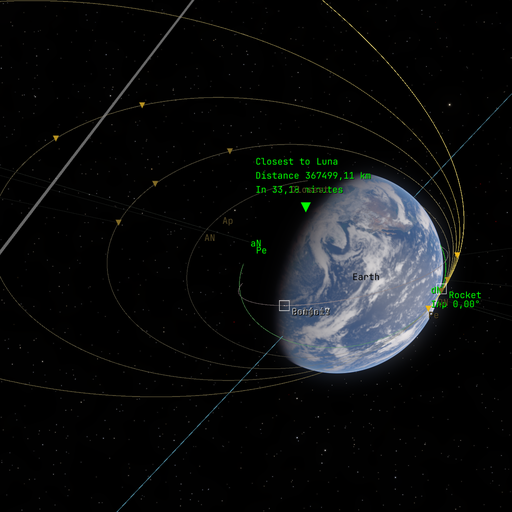
The stock planner aims every transfer at the target body's center, so a well-timed Hohmann arrives as an impact and the flyby has to be set up afterwards as a separate correction. Tick Target flyby periapsis in the Transfer Planning window and the departure burn is aimed to arrive at a periapsis you choose instead, so Create fires the flyby directly.
- Periapsis is entered against a selectable reference: Surface (altitude above the mean radius), Center (radius straight from the body center), or Atmosphere (altitude above the atmosphere boundary). The Atmosphere option only appears for bodies that have one, and a request below the safe floor is refused.
- Flyby side picks which side of the body you pass, named in the target's own orbital frame: Inner (toward its parent), Outer (away from it), North, or South. The aim offset has to stay perpendicular to the approach, so a side whose axis lies along the approach direction cannot be reached and is greyed out.
- Works for moon flybys and for interplanetary targets, either as a single burn or split across multi-pass passes.
- The section reports the approach speed, the impact parameter, the departure delta-V next to the impact-aimed one, and the periapsis the propagated trajectory actually reaches. While a flyby is armed the preview shows that retargeted trajectory in place of stock's center-aimed one.
- For multiple passes, the readout uses the selected departure after any schedule shift and the periapsis from the final preview trajectory.
- If propagation cannot confirm a periapsis, the readout shows No prediction and its reason, such as a departure time outside the flight plan or no resolved target encounter.
Limitations:
- The plan is impulsive, the burn is not. On a near-escape departure the periapsis actually flown drifts from the requested one by roughly the finite-burn loss, on the order of one percent of a multi-km/s injection. Trim it with a small correction burn, or split the departure across several passes to cut the loss.
Multi-Pass Burns
Any of the above plan types (including stock Hohmann and circularize Apse transfers) can be split into multiple burns across successive orbits. Instead of one long burn that sweeps a large arc away from periapsis, the engine fires in shorter bursts near periapsis on each orbit, reducing finite-burn loss.
Supported plan types that can be split:
- Hohmann transfers
- Set Periapsis / Set Apoapsis
- Match Inclination / Set Inclination
- Circularize Apoapsis / Periapsis
How to use:
- Select a plan type and configure the maneuver as usual.
- Use the PASSES slider to choose how many passes (2-10).
- Click Create. The first pass burn is placed in the burn plan.
- Enable Auto burn mode. Each pass fires automatically, with the main engine or as an RCS burn, and the next pass is scheduled after completion.
- The plan window shows "Multi-pass active: pass X of N" with remaining pass details and a Cancel remaining passes button.
Why it helps: When burn duration is a significant fraction of the orbital period, a single burn wastes fuel by thrusting far from periapsis. Splitting across N passes keeps each burn near periapsis where the Oberth effect is strongest. Real lunar kick stages use the same technique, several perigee burns instead of one long injection. It helps most for low-TWR spacecraft such as ion engines, small kick stages and nuclear tugs, where a single departure burn can take tens of minutes.
Hands-free execution: Multi-pass works best with the built-in automatic staging switched on (handles staging between passes) and the built-in automatic burn removal left on (cleans up completed burns). A multi-pass execution then runs hands-free from first ignition to final departure.
Limitations:
- Same-parent transfers (e.g., LEO to Luna) shift the final burn forward by a few parking periods to fit the K-schedule. The shift is shown in the plan window.
- A change to the flyby side or altitude updates the selected departure even during thrust.
- Very high-energy departures from small SOIs (e.g., low Mars orbit to Saturn) may auto-clamp to fewer passes because intermediate orbits would escape the SOI.
RCS Translation Burns
Execute a planned burn with RCS thrusters only, no main engine. Useful for small correction burns (rotating the whole vehicle for the main engine can cost more than just translating) and for vehicles without an active main engine like small probes.
- The stock Auto burn button is still the single trigger: it executes the next burn with its resolved method. A burn resolves to the main engine when an active, fueled engine exists, otherwise to RCS; a per-burn override is available in the burn editor window ("Execution: Default | Engine | RCS").
- Two attitude strategies, selectable per burn: Hold (keep the current attitude, fire the axis mix that points at the burn vector) and Align (rotate the strongest thruster axis onto the burn vector first). Auto (default) compares propellant estimates for both, including the slew cost, and picks the cheaper one.
- Execution is closed-loop against the game's own delta-V accounting: pulses shrink as the remaining delta-V approaches zero, and the burn stops inside the thrusters' minimum impulse of the target. The engine autopilot is suppressed for the whole run, so a misclick can never ignite the main engine on an RCS-armed burn.
- Burns themselves stay in the stock save format; removing the mod keeps every planned burn. The RCS arming metadata lives in
mods/AdvancedFlightComputer/rcs-exec.tomlnext to the mod and survives save/load, including mid-burn. - The burn editor warns when a burn resolves to RCS but no thruster can translate (no propellant, none active) and when the estimated propellant exceeds what the thrusters can actually reach. Auto also shows an alert and refuses the burn before it creates execution state or changes the controls when the burn has no delta-V, no usable translation, or no axis that can serve its direction.
- Estimates for a later planned burn use the current vehicle as an approximation and show Estimate basis: Current vehicle in the burn editor or Current vehicle in the gauge. Stock only loads the first executable burn as its active burn target, so these estimates do not forecast earlier burns or staging.
- Completed RCS burns raise a public event (
RcsBurnCompletions.Completed) other mods can consume; the built-in automatic burn removal uses it to clean up finished RCS burns the same way it cleans up engine auto-burns. - The allocator is selectable per burn (default Groups). Groups fires signed-axis groups and uses attitude control to counter residual torque. LP solves a fuel-optimal jet-selection problem over individual thruster forces and torques (the Bergmann/Draper formulation). LP can require costly counter-thrust, so it is opt-in, and it falls back to Groups when the constraints are infeasible.
Automatic Staging
Stock
With AdvancedFlightComputer
Activates the next sequence whenever the active engines run out of propellant, and drops burnt-out boosters while the rest of the stage keeps firing. Works during auto-burns (continues the burn instead of aborting) and manual burns. Formerly the separate AutoStage mod; remove that mod when you install this version, because two stagers on one burnout would activate two sequences. The settings written by AutoStage are imported on the first load.
- AUTOSTAGE toggle button on the EngineControl gauge panel, in the free slot under RCS. The switch belongs to the vehicle, so an armed craft keeps staging when you control another one. The same switch is available on the Mods settings page for installs without KittenExtensions.
- Control-module guard - a sequence that would separate the last control module is never staged automatically; stage it by hand if that is what you want.
- Auto-burn continuation - keeps the burn mode at Auto through staging so planned burns do not abort.
- Cascade staging - stages again if the next stage is empty or only has decouplers.
- Spent stage drop - sheds burnt-out boosters as soon as they quit, without waiting for the core stage to run dry.
- Configurable staging delays - independent delays for decouplers and engines, simulating separation and engine spool-up time.
- On-screen countdowns - "Decouple in X.Xs" and "Ignition in X.Xs" alerts during a delayed stage.
Spent stage drop. When solid boosters burn out before a liquid core, a trigger that waits for every engine to go dry would carry the empty casings along as dead mass. The mod therefore also stages when the next sequence would jettison nothing but burnt-out hardware: the sequence activates no engine, every active engine it separates is spent, an engine that stays with the vehicle is still firing, and nothing it separates is an engine that has never been activated. It refuses when the separated parts still hold propellant a retained engine can draw from, or when an enabled fuel link crosses the separation, so crossfeed setups are not cut off mid-burn. Turn it off with "Drop spent stages early" on the Mods settings page if staging should wait for a full burnout.
Solid motors in the staging readout. The game's staging model gives a solid motor the burn time of a full grain on every refresh, so a nearly spent booster is shown as a trickle that outlasts the core. The mod paces the motor at the mean flow of the burn it has left, read off its thrust curve, so the in-flight staging window and the guidance stage list end the booster phase where the boosters do.
Staging delays. Two delays are configurable per part variant, both measured from the staging trigger: the engine ignition delay (default values per stock engine variant, the small EngineA1 ignites after 2 s, EngineA3 after 3 s) and the decoupler delay (default 0 s, which matches stock). Set the decoupler delay shorter than the engine delay if the lower stage should drop away before the upper stage lights up.
- Settings window (Settings > Mods > AUTOSTAGE): the two switches, then the "Engine Ignition Delays" and "Decoupler Delays" tables listing every known part variant. Every setting takes effect immediately; click SAVE to persist it.
- Part window (right-click part > Window): override the delay for a specific sequence on the current vehicle. A part gets one block per sequence it fires something in, each naming the module it covers. Per-vehicle overrides take priority over the global config.
The global config is Documents\My Games\Kitten Space Agency\mods\AdvancedFlightComputer\autostage.toml:
[staging]
drop_spent_stages = true

[engine_delays]
CorePropulsionA_Prefab_EngineA2 = 2.0
CorePropulsionA_Prefab_EngineA3 = 5.0

[decoupler_delays]
CoreFairingA_Prefab_Interstage3W3HB = 1.0
Per-vehicle sequence overrides are stored next to it in autostage-vehicles\<vehicle-id>.toml, created automatically when you set an override in the part window, with separate [sequence_delays] (engines) and [decoupler_delays] sections. Nothing is written to a game save.
Automatic Burn Removal
In stock KSA, when an auto-burn completes the flight computer flips the burn mode to Manual but leaves the burn entry in the plan, so you have to click "Delete" before the next maneuver can take focus. This feature cleans up completed burns automatically. Formerly the separate AutoRemoveFinishedBurns mod; remove that mod when you install this version. Its saved switch is imported on the first load.
- Auto-burns are removed as soon as the flight computer flips out of Auto mode on completion. Completion is confirmed through the same delta-V vector reversal the stock flight computer uses, so a burn that flamed out before reaching its target stays in the plan and can be resumed after staging.
- RCS burns executed by this mod are removed on their completion event.
- Manual burns are never touched, and only the vehicle you control is watched. A burn that finishes on a background vehicle stays in its plan.
- Switch on the Mods settings page, on by default, persisted in
Documents\My Games\Kitten Space Agency\mods\AdvancedFlightComputer\autoremove.toml.
Hyperbolic Targets
The stock Transfer Planner filters out bodies with eccentricity >= 1. This mod lets it target interstellar comets (Oumuamua, 2I/Borisov, 3I/ATLAS) by patching the planner's time-of-flight and alignment math to handle unbound orbits.
Powered Guidance
Closed-loop guidance that flies the vehicle for you, originally the PoweredGuidance mod by cairn5, see Credits. Open the AFC Guidance menu in the top bar, switch Enabled on and open the panel with Show panel. EXECUTE, ABORT and RETARGET act on the selected tab.
- Ascent flies UPFG, the Space Shuttle's ascent guidance, to a target periapsis, apoapsis, inclination and LAN, optionally holding the argument of periapsis too and otherwise inserting wherever the burn costs least dV, with an optional launch window, g-limit and booster reserve. Launching to a target vehicle flies a co-elliptic chase orbit below it. Staging goes through automatic staging, and a stage that separates with a command pod can get its own landing site.
- Boostback flies a separated booster back toward its landing site with a settling burn, a flip, the boostback burn and an entry attitude, against an impact prediction through the atmosphere.
- Deorbit and land flies the whole chain from orbit: the deorbit burn, a fuel-optimal powered descent with G-FOLD or the 6-DOF solver, and a terminal hover to touchdown.
- Land from here starts only the powered descent and the hover, from where the craft is now.
Guidance takes a craft only when you press EXECUTE, and it lets go when you abort, take over the attitude or arm the stock Auto burn. An abort during the powered descent or the terminal hover leaves the engine as it is, so the craft does not drop, while every other abort cuts the engine. The hover refuses a craft whose thrust at minimum throttle exceeds its weight, because such a craft climbs whenever the engine runs, and a G-FOLD or 6-DOF descent that would hand over to it flies its own plan to touchdown instead. G-FOLD suits airless bodies and agile landers that point with RCS. The 6-DOF solver models the vehicle rotation, so it handles boosters with high rotational inertia and descents through an atmosphere. The native solvers clarabel_c.dll and scs.dll ship with the mod. See the guidance documentation for how it works.
Installation
- Install StarMap and KittenExtensions (the latter is only required for hyperbolic targets and the AUTOSTAGE gauge button).
- Download the latest release from the Releases tab.
- Extract into
Documents\My Games\Kitten Space Agency\mods\AdvancedFlightComputer\. - The game auto-discovers new mods and prompts you to enable them. Alternatively, add to
Documents\My Games\Kitten Space Agency\manifest.toml:
[[mods]]
id = "AdvancedFlightComputer"
enabled = true
Dependencies
- StarMap: Mod loader, required at runtime (see Installation). Tested version 0.4.6.
- KittenExtensions: Optional, required at runtime for the hyperbolic-targets and AUTOSTAGE button XML patches. Tested version v0.4.0.
Build dependencies
Required only to build the mod from source. Targets .NET 10.
- StarMap.API from NuGet, tested version 0.3.6.
- Lib.Harmony from NuGet, tested version 2.4.2.
The native guidance solvers are built from the vendored sources with Rust and Zig, see native-build.md.
Mod compatibility
- AutoStage, AutoRemoveFinishedBurns and PoweredGuidance are now part of this mod. Delete their folders under
mods, because a disabled mod still applies its XML patches. - Known conflicts: none
Credits
- Oliver Cairns (cairn5) wrote PoweredGuidance, which is the powered guidance in this mod: the UPFG ascent and its landing mode, G-FOLD, the CAT-S successive-convexification 6-DOF guidance, boostback, terminal hover, returnable stages, the impact prediction and the guidance panel. Its full history is part of this repository, and he is co-author of the project.
- PEGAS by Noiredd is the reference and foundation for the UPFG implementation; its MIT license is kept at
third_party/pegas/LICENSE. - G-FOLD follows Acikmese and Ploen, Convex Programming Approach to Powered Descent Guidance for Mars Landing (2007), and Acikmese, Carson and Blackmore, Lossless Convexification of Nonconvex Control Bound and Pointing Constraints of the Soft Landing Optimal Control Problem (2013).
- Clarabel by Goulart and Chen and SCS by O'Donoghue are the conic solvers behind G-FOLD and the 6-DOF guidance.
License
MIT - see LICENSE. Vendored code under third_party/ keeps its own upstream license.
PoweredGuidance releases up to and including v0.3.1 linked ECOS, which is GPLv3, and were therefore distributed under GPLv3 as a whole. Those releases stay available under GPLv3, but ECOS was replaced by Clarabel (Apache-2.0) before the import, so nothing in the current tree is GPL.
Attribution for the vendored solvers and their own transitive dependencies is in THIRD-PARTY-NOTICES.md; all of them are permissive, and none impose copyleft on this work.
Community
Thread on the KSA forums: https://forums.ahwoo.com/threads/advanced-flight-computer.783/
Check out my other mods
- DeltaVMap - interactive delta-v subway map and transfer-window planner, auto-generated from the loaded system (forum thread)
- MeasureTools - click-to-measure ruler, protractor, and surface measuring in the map view (forum thread)