 Borea
Borea
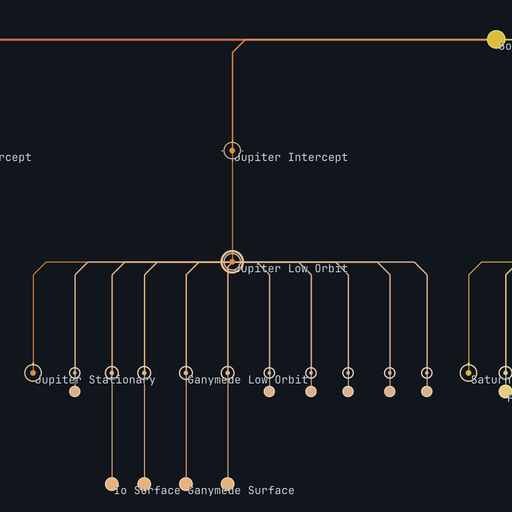
DeltaVMap
An interactive, auto-generated delta-v subway map and transfer-window planner for Kitten Space Agency.
- User Interface
Description
It reads the loaded solar system live, so it works with any system, stock or modded, with no per-system setup.
This mod is written against the StarMap loader.
What it does
The map tells you "where can I go from where I am and for how much delta-v". The transfer-window layer answers the "and when do I leave" question.
Both are generated from the loaded CelestialSystem, recurse through every planet, moon, asteroid and comet, and read each body's mass, radius, SOI, orbit and atmosphere. Nothing is hardcoded.
All numbers are closed-form patched-conic estimates (Hohmann transfers with Oberth-combined departure and capture, no iterative solver), so the whole map is fast and every transfer is cached once per session.
The delta-v figures are the idealized optimal values, so they assume a well-timed, well-flown transfer. A "piloting-margin percentage" slider is available.
Features
Delta-v subway map
- Ego-centric metro layout. The body you are currently in is the root; the map re-roots automatically on the next open after an SOI change, and Shift-Click re-roots to any body on demand.
- Accurate budgets. Closed-form Hohmann transfers with Oberth-combined ejection and capture, a per-body state ladder (surface, low orbit, stationary, SOI edge, intercept) and a "you are here" marker at your actual orbit.
- Route planning. Click any body to highlight the exact route from your current state, with a running total and a per-segment breakdown. Toggles for from-surface, landing, aerobraking, plane change and a return trip, plus a piloting-margin percentage to budget for non-optimal flying.
- Vehicle comparison. A bar compares the selected route against your ship's available delta-v.
- Readable at scale. Node-symbol vocabulary with a legend, search / focus / isolate, and automatic minor-body aggregation so a dense system (thousands of asteroids) stays usable.
- Three layout modes, switched from the on-canvas toggle or the Options menu:
Cumulative-down (default)
Gravity-well
Spring
Transfer windows
The timing companion to the map. For the root body and every sibling sharing its parent, it shows the optimal phase angle, the live current phase, a countdown to the next window, the synodic period, the ejection angle and the transfer time, in a compact list plus a live polar phase-clock.
A separate, opt-in layer draws the same data in the game's 3D map mode: the optimal-departure marker on the destination's real orbit (where it will be when the window opens), the planet-star-planet phase angle, and an ejection-angle gizmo at the departure body.
Installation
- Install StarMap.
- Download the latest release from the GitHub Releases tab or from SpaceDock.
- Extract into
Documents\My Games\Kitten Space Agency\mods\DeltaVMap\. - The game auto-discovers new mods and prompts you to enable them. Alternatively, add to
Documents\My Games\Kitten Space Agency\manifest.toml:
[[mods]]
id = "DeltaVMap"
enabled = true
Open the map from the View -> "Delta-V Map" menu in flight, or the top-level Delta-V Map tab in the editor.
Dependencies
- StarMap: Mod loader, required at runtime (see Installation). Tested version 0.4.6.
Build dependencies
Required only to build the mod from source. Targets .NET 10.
- StarMap.API from NuGet, tested version 0.3.6.
- Lib.Harmony from NuGet, tested version 2.4.2.
Mod compatibility
- Known conflicts: none
Community
Thread on the KSA forums: https://forums.ahwoo.com/threads/deltavmap.978/
Check out my other mods
- AdvancedFlightComputer - maneuver planning, burn execution, automatic staging and closed-loop guidance (forum thread)
- MeasureTools - click-to-measure ruler, protractor, and surface measuring in the map view (forum thread)